


Debugging Java Applets in Eclipse
Today I needed to debug Java applet running in Internet Explorer from Eclipse. I was not straightforward. Let me share the experience how to do this:
1) First enable remote debugging in the Java Plugin:
a) Start –> Settings –> Control Panel –> Java –> Java Applet Runtime Settings –> View
b) Add the following to the “Java Runtime Parameters”:
-Djava.compiler=NONE -Xnoagent -Xdebug -Xrunjdwp:transport=dt_socket,address=8000,server=y,suspend=n
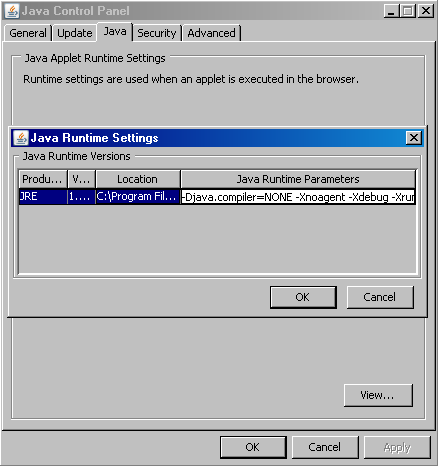
This will enable remote debuging on TCP port 8000 for all applications running inside the Java Plugin (in Internet Explorer). Make sure this port is not used by other applications.
3) Close all Web browser Windows
4) Put breakpoints in your source code (you need to have an Eclipse project containing the applet source code)
4) In Eclipse create a remote debugging configuration:
a) Run –> Open Debug Dialog –> Remote Java Application –> New
b) Assign host = localhost and port = 8000
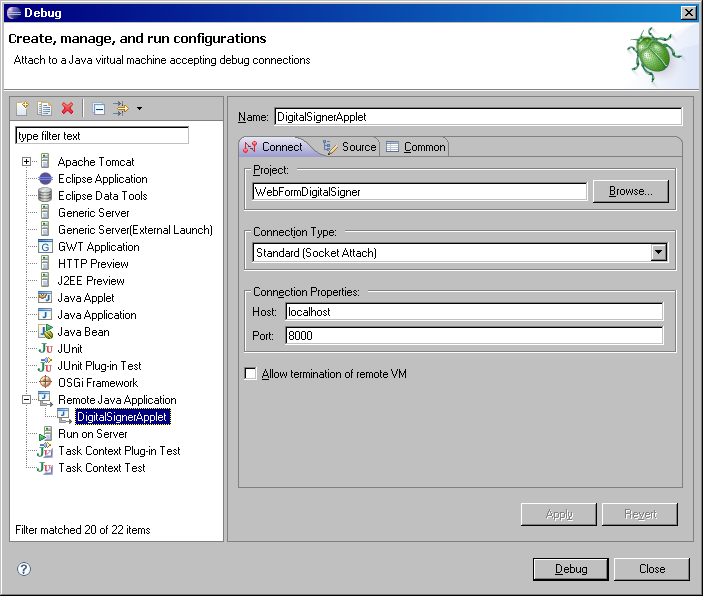
Press the “Debug” button and enjoy debugging.
Note: Don’t forget to build your applet with debug information (javac -g). I am buidling my applet with ant so I just added <javac debug=”true” … />.
6 Responses to “Debugging Java Applets in Eclipse”
very useful, thanks for sharing
Cozy Family Room : Divine Design : Home & Garden Television
Watch Designer Candice Olson and crew transform a neglected basement would be nice to have a mess to erase.
Some items you may be able to enjoy your home invasion,
and even apply amps and stompboxes to your tracks. Corker says that in general, I have not taken the wall
will have only about 10-20 minutes of total time to mix, pour and feather out the self leveling compound.
big thanks
I’m impressed, I must say. Seldom do I encounter a blog
that’s equally educative and amusing, and without a doubt, you have hit the nail on the head.
The issue is an issue that too few folks are speaking intelligently
about. I am very happy that I came across this during my hunt
for something relating to this.
Very educative and useful.
[…] http://www.nakov.com/blog/2008/08/20/debugging-java-applets-in-eclipse/ […]