


svnleave – a Tool for Cleaning-up an SVN Directory
When you need to copy a project that resides in a Subversion repository to another location or send a piece of the source code by email, you need to clean the all .svn or _svn files from its directory structure.
I know an easy way to do this by the TortoiseSVN GUI client for Windows:
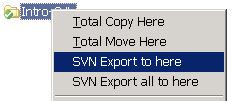
This works pretty well but sometime you need more simple solution: removing all .svn directories from given project. I didn’t found any useful tool for this so I wrote one: svnleave.
My favourite programming language for writing such small programs is C#. It is highly productive, user friendly, have very good development environment and runs on any Windows machine (I mostly use Windows as desktop).
Here is the source code:
using System;
using System.Collections.Generic;
using System.Text;
using System.IO;

/**
 * This utility deletes all ".svn" and "_svn" directories from
 * the current directory and its subdirectories recursively. It
 * is helpful when you need to send to somebody a part of your
 * project that is under version control with Subversion.
 *
 * The "svn export" command can help in most cases but this
 * solution can be better when you cannot perform export.
 */
class SVNLeave
{
    static void Main(string[] args)
    {
        string currentDir = Directory.GetCurrentDirectory();
        DeleteSVNDirectories(currentDir);
    }

    /**
     * Deletes all ".svn" and "_svn" directories from given directory
     * recursively in depth.
     */
    private static void DeleteSVNDirectories(string path)
    {
        string[] subdirs = Directory.GetDirectories(path);
        foreach (string subdir in subdirs)
        {
            FileInfo subdirFileInfo = new FileInfo(subdir);
            String subdirName = subdirFileInfo.Name;
            if ((subdirName == ".svn") || (subdirName == "_svn"))
            {
                DeleteSubdirectory(subdir);
            }
            else
            {
                DeleteSVNDirectories(subdir);
            }
        }
    }

    /**
     * Deletes a directory along with all its subdirectories. Unlike
     * Directory.Delete(path, true) deletes read-only and system files.
     */
    private static void DeleteSubdirectory(string path)
    {
        string[] subdirs = Directory.GetDirectories(path);
        foreach (string subdir in subdirs)
        {
            DeleteSubdirectory(subdir);
        }

        string[] files = Directory.GetFiles(path);
        foreach (String file in files)
        {
            File.SetAttributes(file, FileAttributes.Normal);
            File.Delete(file);
        }

        File.SetAttributes(path, FileAttributes.Normal);
        Directory.Delete(path, false);
    }

}
A compiled version svnleave for .NET Framework 2.0 is available for download here: svnleave.exe.